Voice agent skills for coding assistants


There’s a new workflow emerging for developers. Instead of reading docs line by line, you open Cursor, Claude Code, Codex, or Copilot and say:
“Build me a voice agent.”
Sometimes it works. Sometimes it almost works. And sometimes it confidently builds something that doesn’t run at all.
This isn’t because coding agents can’t write code. They can. It’s because building voice agents sits at the intersection of three hard things: realtime systems, evolving SDKs, and large language models that were trained months ago.
If you’re trying to build voice agents with an AI coding assistant today, you’ve probably hit at least one of these problems:
- The model relies on outdated API patterns or docs it “remembers.”
- It guesses method names or configuration options.
- It crawls existing documentation without a clear strategy and gets lost.
- It produces code that looks correct but fails at runtime.
- It writes tests that pass locally but don’t reflect how a real-time voice agent behaves in production.
The result is building voice agents with coding agents feels unpredictable – sometimes it’s magical, sometimes it’s frustrating. We built something to stabilize that workflow.
Today, we’re introducing LiveKit Agent Skills — a new way to build voice agents with coding assistants, designed specifically for realtime voice AI development.
The challenge with asking coding assistants to build voice agents
Coding assistants are powerful, but they operate in one of two modes:
- They rely on the text they were trained on.
- They try to reason their way through live documentation.
The first mode fails when SDKs evolve. The second mode fails when documentation is large, inconsistent, or requires architectural judgment. Voice agent development makes both issues worse.
Unlike static APIs or simple CRUD apps, voice agents are realtime systems. They involve streaming audio, turn detection, tool invocation, state transitions, and latency constraints. The best way to build voice agents isn’t just “call the right function.” It requires architectural discipline:
- Keep context small.
- Avoid tool overload.
- Design clean handoffs.
- Test behavior, not just code.
- Account for race conditions and real-time events.
Coding agents don’t naturally enforce those constraints. They need guidance.
What is an agent skill?
Agent skills are installable instruction bundles for coding agents like Cursor, Claude Code, Copilot, and Codex. They live inside your project and are loaded when the agent is working.
Critically, they do not auto-update. That design choice matters. Because skills are frozen after installation, they are a terrible place to store API details or version-specific knowledge. If you hardcode method names into a skill, it will drift and become wrong.
Our LiveKit Agent Skills do something different. They don’t teach the LiveKit API, they teach your coding assistant how to build voice agents correctly by encoding architectural behavior and best practices instead of API knowledge.
The best way to build voice agents with a coding agent
The LiveKit Agent Skills enforce a few core rules that dramatically improve reliability:
- Never trust model memory for API details. Always consult live documentation and verify method signatures.
- Treat agent behavior as production code. Prompt changes are code changes. Tool descriptions affect behavior. Testing is not optional.
- Optimize for realtime performance. Voice agents are latency-sensitive systems. Bloated prompts and giant tool lists slow everything down.
- Structure workflows intentionally. Instead of one monolithic agent that does everything, use scoped tasks and handoffs to manage complexity and reduce context.
These principles remain correct even if the SDK evolves.
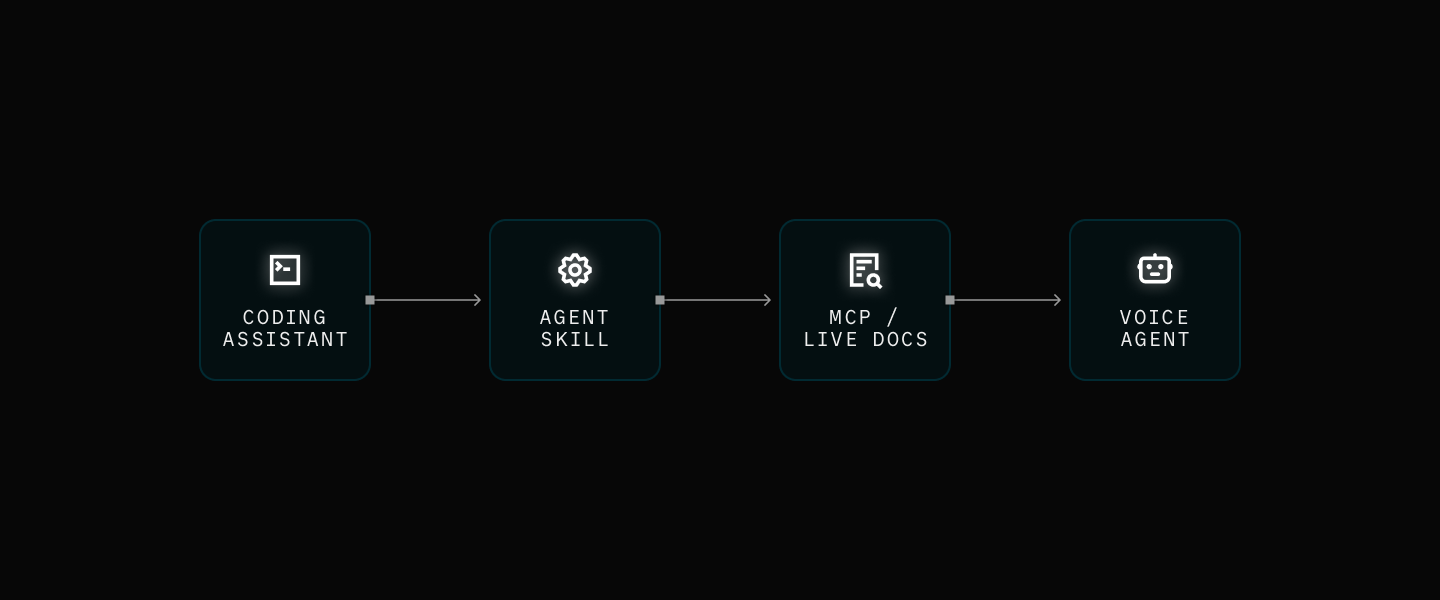
All API specifics still come from live documentation and LiveKit’s Docs MCP server. The agent skill simply ensures the coding agent approaches voice agent development with the right mental model.
From prompt to working voice agent
To validate this approach, we built an internal evaluation harness that measures how well coding assistants can build working voice agents from natural language prompts.
We tested the coding agents across three scenarios: a basic voice assistant, a weather agent with custom tool use, and a multi-agent live newsroom with handoffs, external APIs, and distinct voices. Each configuration was run multiple times to measure consistency. We captured full logs, analyzed failure points, and every generated agent was spun up on LiveKit Cloud and tested in an actual room, not just with unit tests.
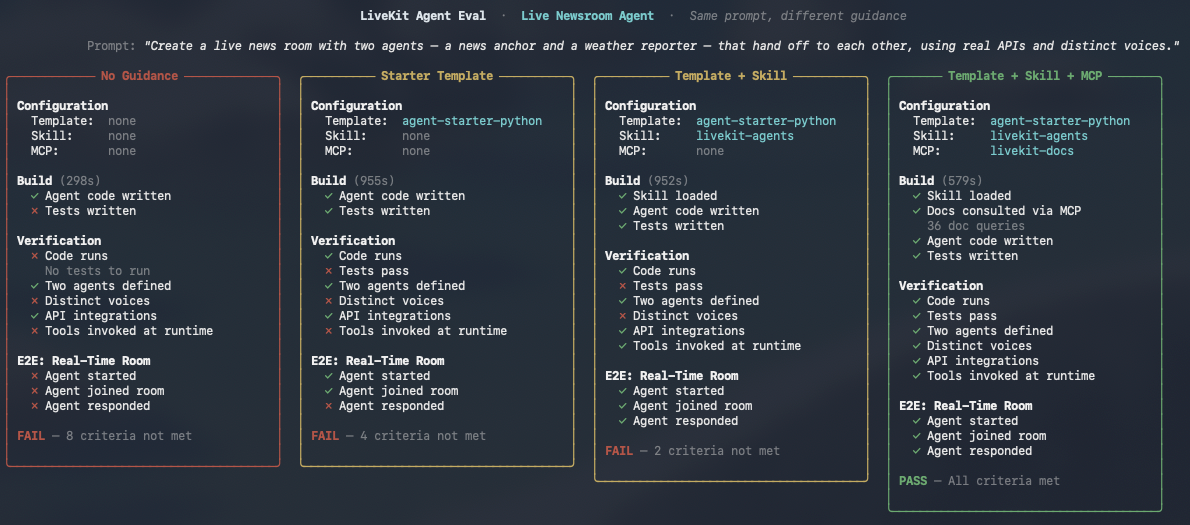
The results are clear: without guidance, coding agents hallucinate. They import from modules that don’t exist. They guess method signatures from outdated training data. They pin dependencies to versions that were never published. In 11% of blank-workspace runs, coding agents built JavaScript apps instead of LiveKit Agents entirely.
However, when coding assistants are guided architecturally and forced to verify APIs against live documentation, they generate working voice agent code at a dramatically higher rate. The failures shift away from hallucinated APIs and toward deeper issues like real-time timing or test orchestration, problems that are much easier to reason about and improve.
With the agent skill and MCP server, the same assistants produce working code every time. Across all the coding agents and all three scenarios, 100% of generated agents started, joined a room, and responded to users.
Here’s what the progression looks like:
| What the coding agent has | Code runs | Agent works in a room | Full eval pass |
|---|---|---|---|
| Nothing (blank workspace) | 61% | 25% | 2% |
| Agent starter template | 100% | 82% | 63% |
| Template + Agent Skill | 100% | 93% | 68% |
| Template + Skill + MCP Server | 100% | 100% | 80% |
Each layer solves a different class of problem. The starter template eliminates build failures and dependency hallucinations. The agent skill enforces architectural patterns, including using handoffs, keeping context small, writing tests, and verifying APIs. The MCP server provides live access to current documentation so the coding agent never has to guess a method signature.
The full skill stack makes the biggest difference on the hardest problems. For basic voice assistants, the template alone gets you to 95%. But for complex multi-agent workflows with handoffs and API integrations, using the agent starter template alone passes only 25% of the time. Adding the agent skill and MCP server more than doubles that.
The remaining failures? Almost all of them are test quality issues, not code quality issues. In 92% of cases where the full skill stack didn’t pass every criterion, the generated voice agent still worked — it started, joined the room, and talked to users. The failures were things like hallucinated test method names or stale imports in test files. The agent code itself was correct.
Why agent skills for voice agents matter now
More and more developers are asking:
- What’s the best way to build voice agents?
- Can I use an AI coding assistant to build a production voice agent?
- How do I avoid hallucinated APIs in realtime applications?
- How do I go from idea to working voice AI in minutes?
The answer isn’t just better models, it’s better guidance toward reliable patterns. Agent skills give coding agents a stable development philosophy while leaving all dynamic knowledge in live docs. That combination, skill + current documentation via MCP server, is what makes building voice agents with coding assistants viable at scale.
Get started with LiveKit Agent Skills
We built the LiveKit Agent Skills to answer a simple question: “If you ask a coding assistant to build a voice agent, what’s the most reliable way to make that succeed?”
The LiveKit Agent Skills can be installed into your project and works alongside our documentation and MCP server. It’s being rolled out across starter repositories, referenced in AGENTS.md, and integrated into the broader LiveKit developer experience. You can install the agent skill for your coding assistant by running:
npx skills add livekit/agent-skills
The Github repository is here: https://github.com/livekit/agent-skills
What we have today is version one, and it’s intentionally thin but designed to be evergreen. Give it a try and let us know what you think.